
TL;DR: A poker player built a Notion study system but it looked like a personal draft, not a sellable product. I rebuilt the database architecture, added metrics dashboards and automated roadmaps, then wrapped it in a premium dark-themed design. The result: a polished training product ready to sell.
The Client
The client is a poker player and aspiring product creator based in the UK. He’d been studying tournament poker for a while and realized that most players — especially at micro and low stakes — study randomly. No structure, no tracking, no feedback loop.
So he built a Notion-based study system called the MTT Study Blueprint. The idea was solid: weekly study plans, session logging, a progress tracker, and a suggested roadmap for beginners. He had the concept and the poker knowledge. What he didn’t have was a product that looked and felt worth paying for.
The Problem
When the client reached out, he shared his workspace and asked a direct question: “Is there a lot you can do to this Notion project to really increase its perceived value, or is Notion quite limited?”
The answer was: Notion isn’t limited — but perceived value doesn’t come from aesthetics alone. It comes from experience design, structural depth, and transformation clarity.
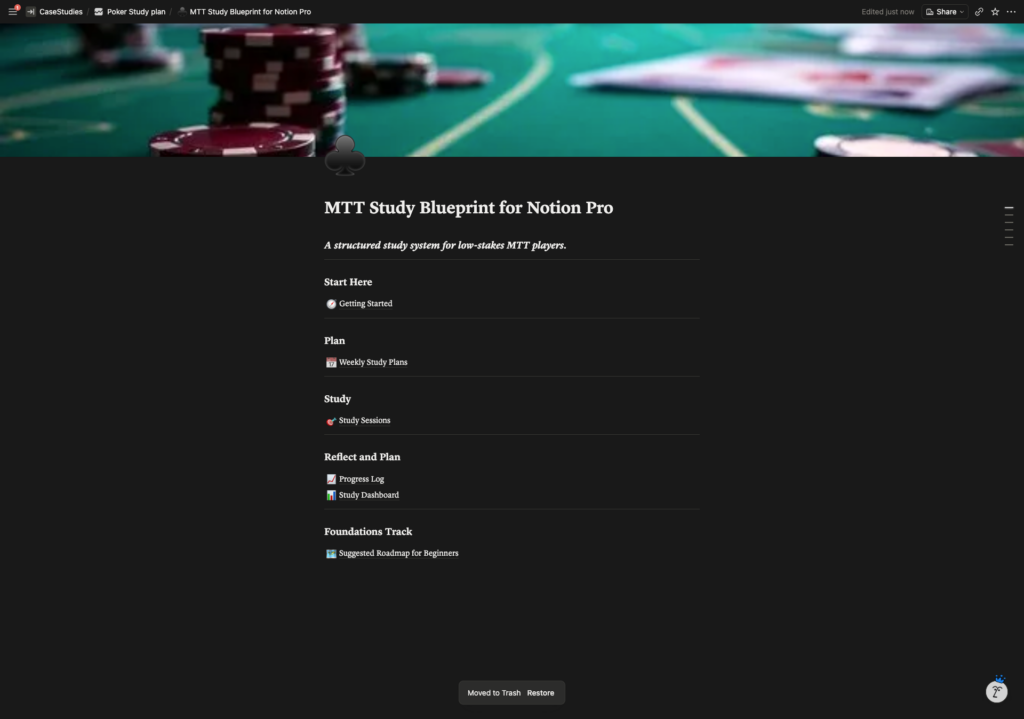
His workspace at that point was functional but flat. Navigation was a simple list of page links on a white background. The databases felt like spreadsheets. There was no visual hierarchy, no metrics, no sense of progression. A first-time user would open it and not know where to start.
The core content was good. The packaging wasn’t.

The Approach
Before jumping into the build, I reviewed the client’s product truth document — a detailed breakdown of who the product was for, what problem it solved, and how the study loop was meant to work. This gave me the structural blueprint.
I sent the client a Loom video walking through my proposed rebuild so he could see the direction before any work started. That’s something I do with most projects — it aligns expectations early and avoids wasted iterations later.
Here’s what I proposed:
Database Architecture: Replace the flat page structure with three interconnected databases — Weekly Plans, Study Sessions, and a Decisions library. Each study session links back to its parent week. Each decision type accumulates data over time so the user can track their confidence and mastery growth across specific poker spots.
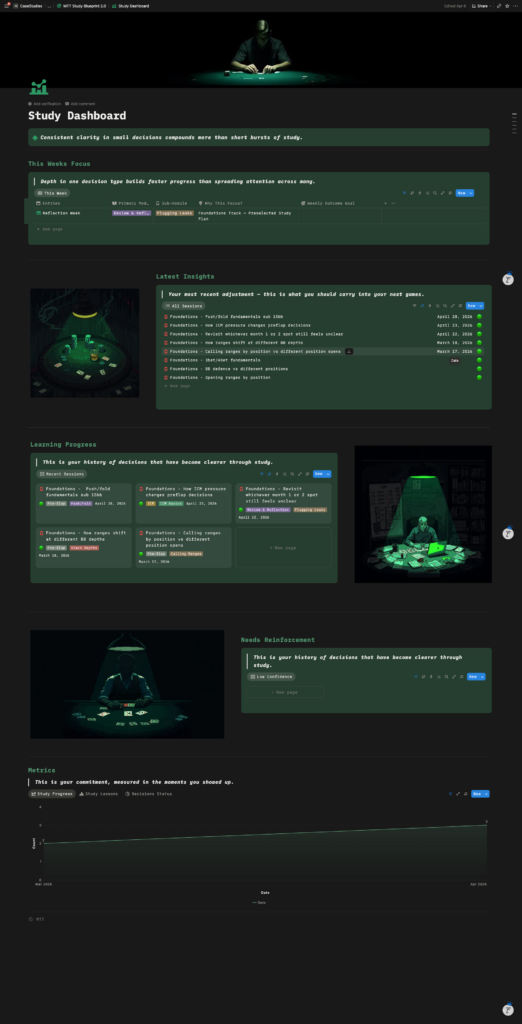
Metrics & Dashboards: Add Notion Charts showing sessions per week, average confidence trends, completion vs. target rates, and decision mastery status. This turns the system from a journal into a training engine with visible feedback.
Foundations Roadmap Automation: The client had a 4-month beginner study roadmap, but no clean way to deliver it without cluttering the weekly plan history. I built load buttons — one per month — that generate pre-filled weekly plan entries on demand. The user chooses how much of the guided roadmap they want, and it populates cleanly without affecting their own custom weeks.
Sub-Module Filtering: The original setup had a flat dropdown for sub-modules across all poker categories. A user studying ICM would still see preflop-specific spots in their options. I restructured this with separate module databases to keep selections relevant.
The client took a few days to validate his product concept with real users before committing. Smart move — and the validation confirmed the direction. He came back with one addition: a Foundations Track page for beginners, which we folded into the roadmap automation.
The Build
The design direction was “clean, premium, and dark — with a poker pixel art theme.” The client shared references from high-end Notion templates and Instagram reels showing the level of polish he was going for.
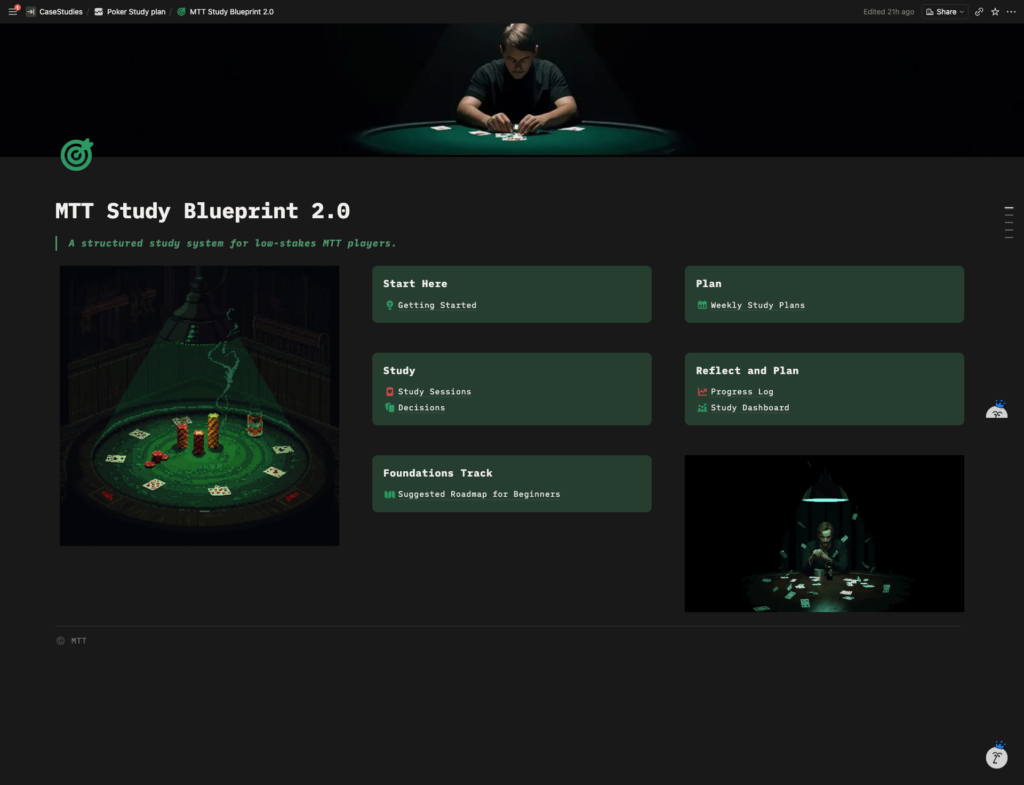
I rebuilt the homepage from a simple list of links into a widget-style dashboard layout with card-based navigation. Dark background throughout. AI-generated poker pixel art (created using Claude and Canva) placed throughout the product as visual accents. The goal was to make it feel like opening an app, not a Notion page.
The databases got the same treatment — gallery views replaced table views where appropriate, visual hierarchy was added to make the data feel meaningful rather than spreadsheet-like. The Progress Log in particular was redesigned to surface patterns: recurring leaks, improving spots, and confidence ratings over time.
Throughout the build, the client and I went back and forth on details — how the decisions database should handle beginner-level vs. advanced entries, whether pre-loaded study sessions should auto-generate alongside weekly plans, and how to name auto-generated entries so they didn’t confuse first-time users. Every iteration tightened the product.


The Result
The final product was a complete transformation. In the client’s words:
“The second version is a massive improvement and honestly looks like a premium product now. The dark theme, the layout, the AI art, the gallery views and the linked databases all come together really well.”
He also said:
“The functionality is exactly what I was looking for — the linked databases, metrics, load buttons for the roadmap and the decisions tracking are all great.”
What started as a skeleton became a structured training engine with a premium design layer — ready to sell.
What Made This Project Work
Starting with the product truth document. The client didn’t just say “make it look better.” He’d defined who his user was, what problem the product solved, and how the study loop was meant to function. That clarity made the build faster and the result sharper.
Loom proposals before building. Walking through the plan on video before touching the workspace meant we were aligned from day one. No major surprises, no wasted work.
Iterative refinement. The first delivery nailed the functionality. The second delivery nailed the design. Splitting those two let us validate the engine before polishing the exterior.
Client validation mid-project. The client paused the project to validate with real users before spending money on aesthetics. That’s smart product thinking, and it gave us a stronger brief for the design phase.
Project Summary
| Client | Poker player & aspiring product creator (UK) |
|---|---|
| Product | MTT Study Blueprint — a Notion-based poker study system |
| Scope | Full database architecture rebuild, metrics dashboards, automated roadmap delivery, sub-module filtering, and premium dark-themed design |
| Turnaround | 7 business days |
| Key Deliverables | 3 interconnected databases (Weekly Plans, Study Sessions, Decisions), Notion Charts dashboards, load-button roadmap automation, gallery views, dark theme with custom AI pixel art |
| Outcome | Transformed a functional but flat workspace into a polished, premium training product — ready to sell |
Need your Notion workspace or template turned into something people will pay for?
I’ve built 400+ custom Notion workspaces for clients across every industry. Whether you’re launching a product, building internal systems, or turning a rough idea into a polished tool — I can help.
Frequently Asked Questions
How much does a Notion template redesign cost?
It depends on the scope — a visual refresh is different from a full database rebuild. Most template product builds fall in the $300–$600 range. Book a free consultation and I’ll give you an honest quote based on what you need.
How long does a Notion product build take?
Most projects are delivered within 5–10 business days, depending on complexity and how quickly we align on the brief. This particular build took 7 days.
Can you turn my existing Notion workspace into a sellable template?
Yes — that’s one of the most common requests I get. If you’ve built something functional for yourself, I can restructure it, add polish, and package it into something customers will pay for.
Do I need to know how Notion works to sell a template?
Not deeply. You need to understand your audience and the problem your template solves. I handle the technical build, UX design, and structural decisions — you bring the domain expertise.
What if I just need the design updated, not the databases?
That’s fine too. Some clients come with solid functionality but need the visual layer elevated. I offer design-only packages as well.