 Isuru
Isuru A small private medical practice came to me after losing a patient they should have kept. Someone had reached out, seemed genuinely interested, and then heard nothing back for two weeks. By the time anyone remembered to follow up, that person had already signed on with another practice.
This is a practice where patients pay a monthly membership directly instead of going through insurance, so the team is small: one doctor, a patient coordinator, and some part-time admin help. When there is no insurance pipeline feeding you a steady stream of patients, every lead that slips away is real money and momentum gone.
The Challenge
Their whole intake process lived in email. A prospective patient would reach out, their details sat in a thread, and following up depended on someone remembering to. There was no list of who had inquired, no clear sense of who was waiting on a reply, and no way to spot the leads about to go cold without scrolling back through old messages. As the practice grew and more people started fielding inquiries, that got worse rather than better.
They didn’t need a big, expensive CRM. Their volume is modest, five to ten new leads a month. What they needed was one clear place where every lead lives and its current status is obvious at a glance.
What I Built
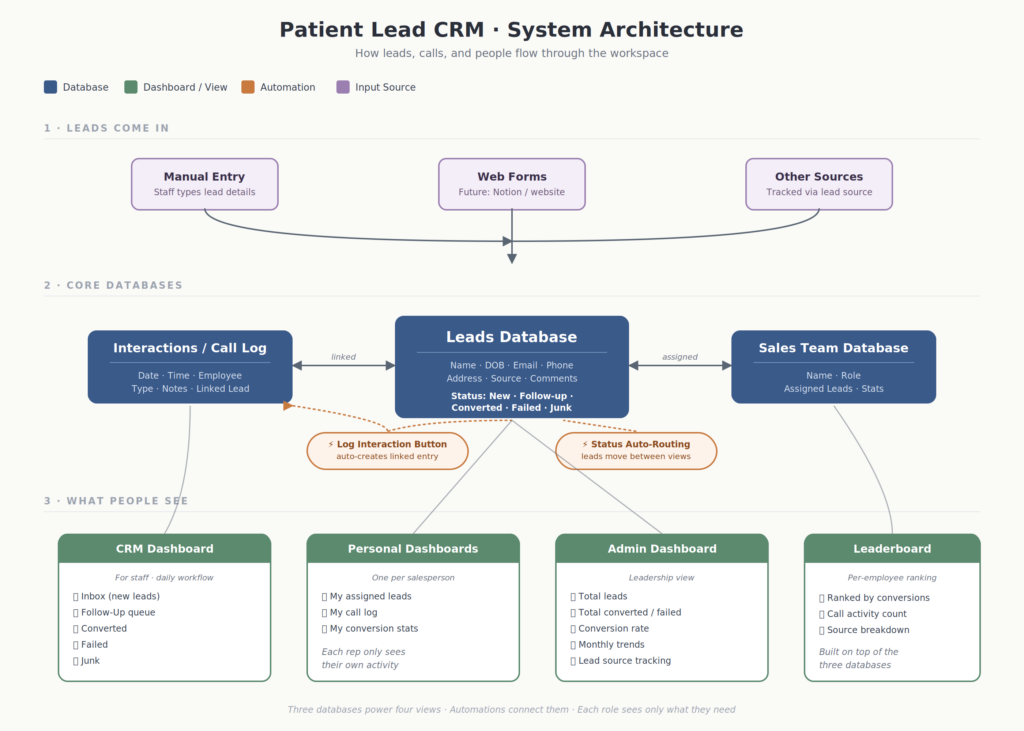
One place for every lead. A simple Leads database, one row per prospective patient, with contact details, where they came from, the date they reached out, and a short status pipeline running from new inquiry through to enrolled, not a fit, or lost. Instead of a scattered email thread, every inquiry is now one clean record you can find in seconds.
A form that fills it in for you. An intake form on the practice website feeds straight into that database, so a new inquiry lands as a new row on its own. The coordinator no longer retypes anyone’s details.
A follow-up log on every lead. Each lead’s page keeps a running log: the date, how you reached out, what happened, and the next step. Open a lead and its whole history is right there, so nobody has to piece it together from memory.
A “who needs attention” view. One view lists every lead that hasn’t been followed up in the last week. That is the quiet fix for the original problem, because the leads going cold rise to the top on their own instead of disappearing.
A separate home for enrolled patients. Once someone signs on, they move to a separate patients list with the details that matter then: membership, renewal dates, and notes. Prospects and members stay cleanly apart.
One boundary worth naming: this is not a medical record. Anything clinical stays in the practice’s existing health record system. This only covers the stretch between “someone is interested” and “they have signed up.”
What Changed
The coordinator’s morning went from “check email and hope I caught everything” to “open one view and see exactly who to call.” Same information, a far more useful shape. In the first month alone, the practice found three leads that had been sitting untouched for over two weeks. Two were still interested. One signed up.
Why the Simple Version Won
The temptation with a project like this is to build something impressive: scoring, automations, a dozen linked databases. This practice needed the opposite. A small team handling a handful of leads a month is far better served by something they will actually open every day than by a system they have to be trained on. The win here was not clever features. It was making the state of every lead impossible to miss, so following up stopped depending on anyone’s memory.