
The Client
A solo-run architecture studio based in the US. The owner handles client work, project management, and billing themselves, using Notion as the day-to-day workspace and QuickBooks for the books. Most projects are billed in stages, so invoicing happens often.
The Problem
Notion and QuickBooks weren’t talking to each other. Every new client had to be created twice: once in Notion, then manually rebuilt in QuickBooks with email, phone, and address. Every invoice generated in Notion had to be recreated by hand in QuickBooks to actually get sent. Payment statuses drifted out of sync, and the project dashboard relied on a manual “fees tracker” column that had to be updated every time something changed.
The client had already tried fixing this with Zapier. Customer names weren’t matching cleanly between the two systems, automations kept failing, and duplicates were piling up. By the time they reached out, they were ready to give up on the idea of connecting the two platforms at all.
The Solution
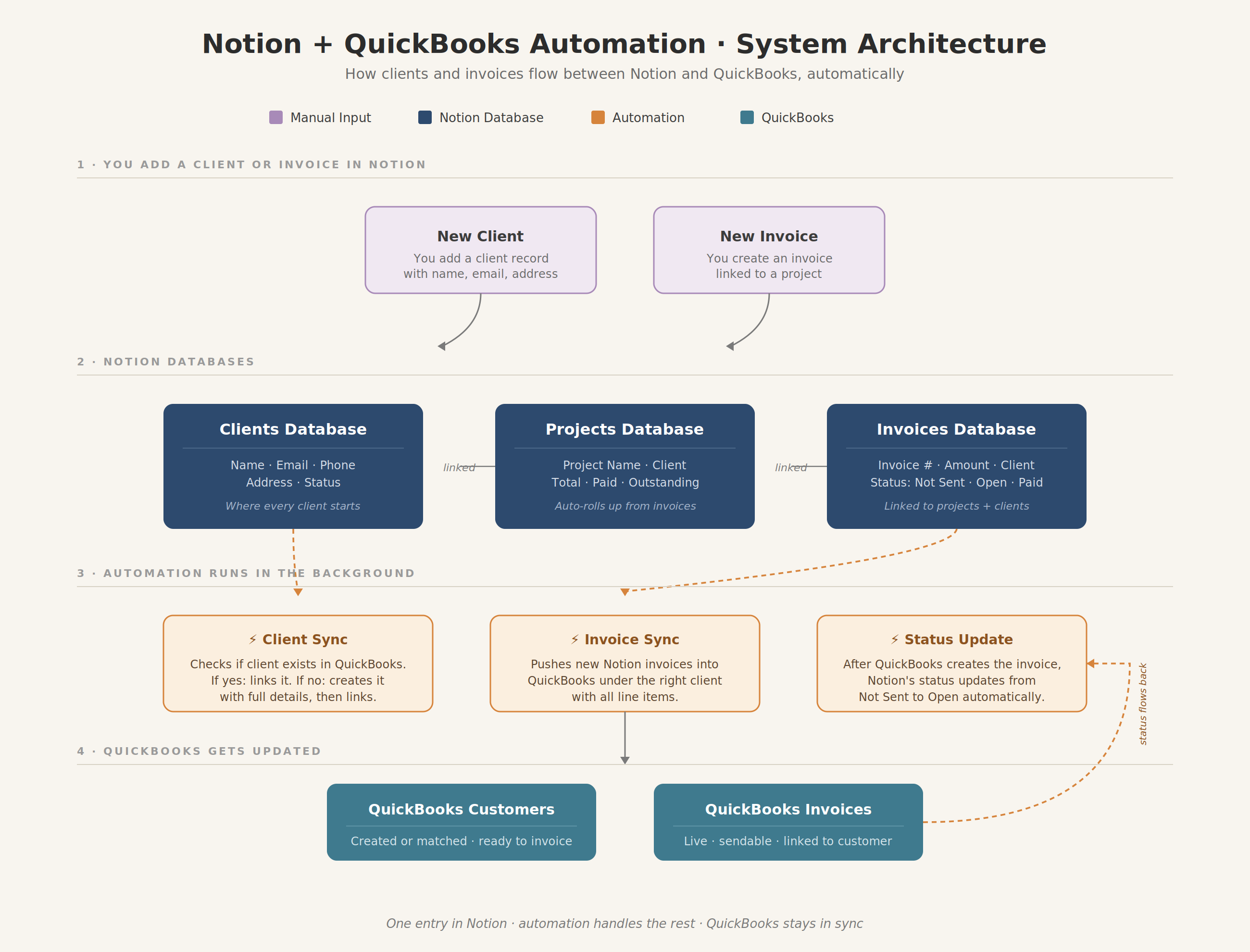
One source of truth in Notion, with QuickBooks staying in sync automatically. Add a client in Notion, the customer record appears in QuickBooks. Create an invoice in Notion, it shows up in QuickBooks linked to the right customer, and the status flows back to Notion once it’s sent.
The project dashboard pulls invoiced and paid totals on its own, so the owner can see where each project stands without updating anything by hand.
What I Built
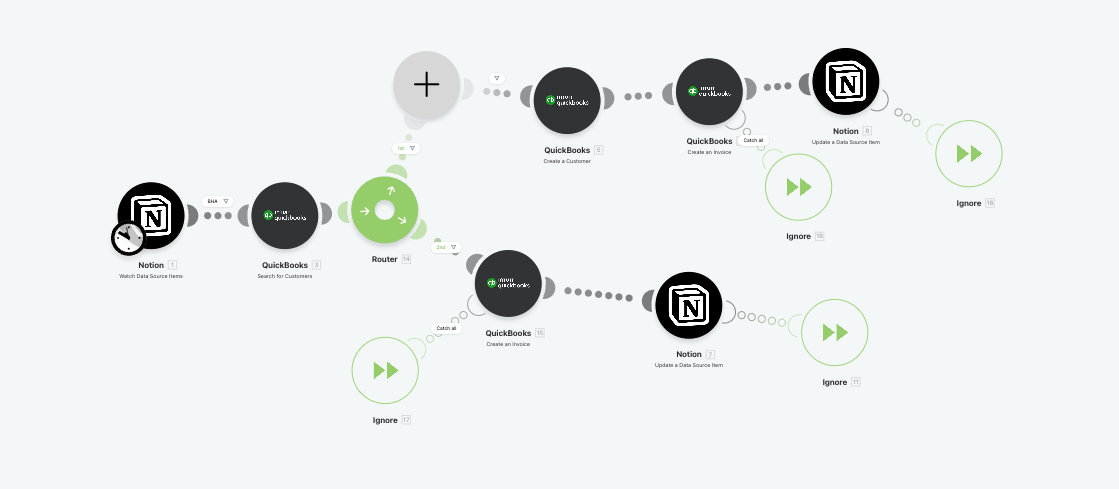
Make.com migration from Zapier. Rebuilt the entire integration on Make instead of Zapier. Make’s router logic handles the conditional flow (check if customer exists, create if not, then create invoice) that Zapier couldn’t manage cleanly.
Notion to QuickBooks customer sync. One entry in Notion now creates a complete QuickBooks customer record, with email, phone, and a properly split address (street, city, state, zip) mapped to the correct QuickBooks fields.
Invoice sync with auto-matching. When a new invoice is created in Notion, the automation checks QuickBooks for the matching customer first. If the customer exists, it links the invoice to that existing record. If not, it creates the customer on the fly and then creates the invoice. No duplicates, no pre-creation step, no broken runs.
QuickBooks to Notion status sync. Once an invoice is created in QuickBooks, the Notion record’s status updates from “Not Sent” to “Open” automatically. No manual tracking.
Project financial dashboard. Rebuilt the project database to auto-calculate total invoiced, total paid, and outstanding balance per project via rollups from the linked invoice database. The manual fees-tracker column was removed entirely.
System Architecture
The Result
- Running on schedule for 7+ months with near-zero failed executions
- Client onboarding reduced from two-system data entry to a single Notion record
- Invoice creation changed from a 5-minute manual task to a one-click action
- Real-time project financial visibility without any manual reconciliation
- Roughly an hour per day of admin time returned to the owner
Client Feedback
“Isuru’s professionalism and attention to detail was excellent, and working with him a breeze. He helped me level up my Notion setup far beyond anything I could’ve figured out myself – highly recommend! 🙌”